“May we have your attention.” Automatic on schedule.
Instant from your phone.

Pick a message on your phone and tap. The counter PC connected to your speakers picks it up and plays it across the store. And the reminder 10 minutes before closing goes out on its own every day.

Download on theApp Store GET IT ONGoogle Play
A neighborhood supermarket in the evening. The owner beside the counter holds a phone and smiles out at the store; there is a PC monitor on the counter and a round speaker on the ceiling.
  1. Owner's phone

    Tap [Send to broadcast device] from anywhere in the store

  2. Counter PC

    The broadcast device connected to the speakers receives it

  3. Ceiling speakers

    It plays clearly across the whole store

Any device can be
your store's broadcast room.

Use your own phone to manage, and connect the counter PC or a spare phone to the speakers to broadcast. One account links every device.

  • ManageWrite messages · schedule · send broadcastsiPhone, Android, PC or web — from anywhere
  • BroadcastOne device connected to your speakersYour counter PC or a spare phone both work
Install the appPoint your phone camera at the QR code
QR code that opens the app page on the App Store
iPhone app iOS 16 or later · Free
QR code that opens the announcement app page on Google Play
Android app Phone & tablet · Android 8.0 or later · Free
Desktop app Chrome & Edge · Windows, Mac, Chromebook
Start on the web without installing

Is your store without internet?The installable Offline Edition broadcasts from a single store PC with no internet and no monthly fee.Learn more about the Offline Edition

Public institutions and businesses nationwide use WeMakeVoice announcements
Hanaro Mart Changwon Facilities Corporation Seocho Cultural Foundation Kakao Entertainment Gwangmyeong City Gyeonggi Tourism Organization Korea National Park Service Gwacheon City
REAL USE CASES

Here's how they're using announcements.

Use the Hear sample button to instantly check announcements used on real sites.

Jirisan National Park

Jirisan National Park

Korea National Park Service

Jirisan National Park runs regularly scheduled announcements. It has provided stable broadcasts for years and offers increasingly professional national-park guidance.

Hanaro Mart

Hanaro Mart

Hanaro Mart

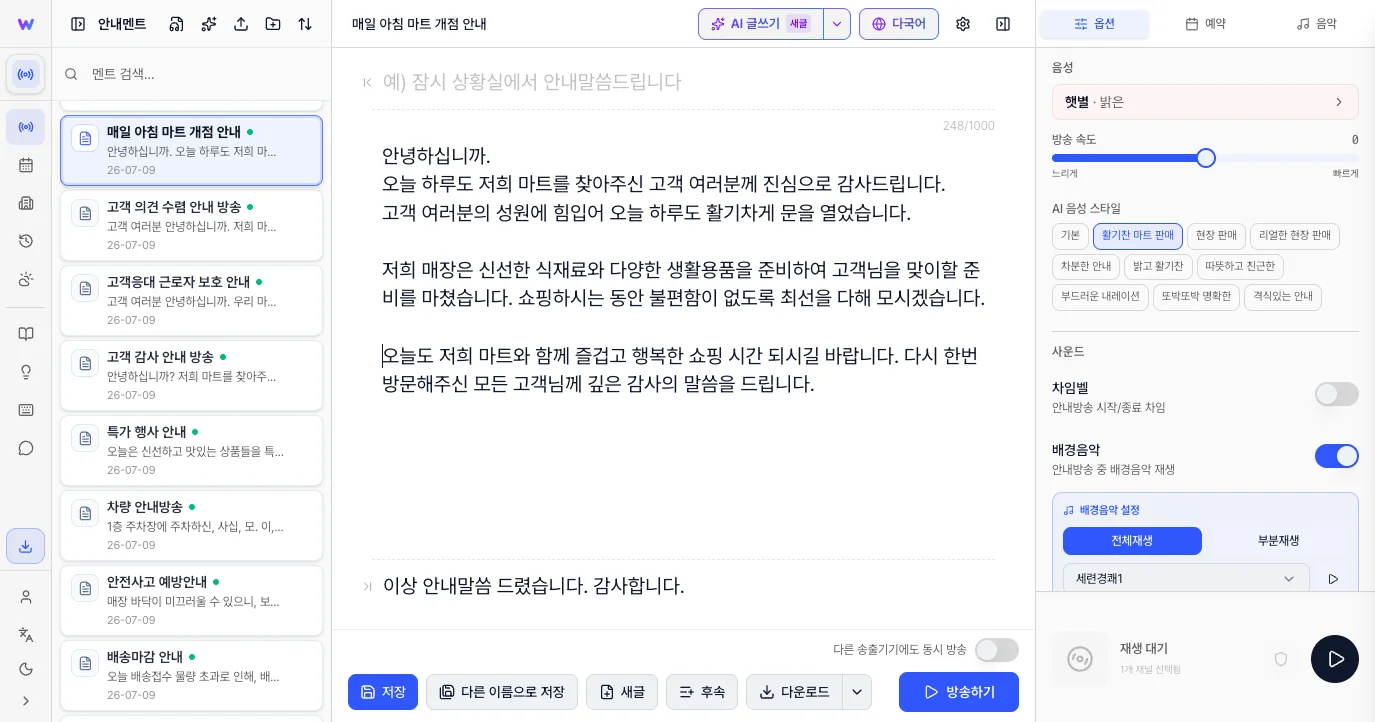
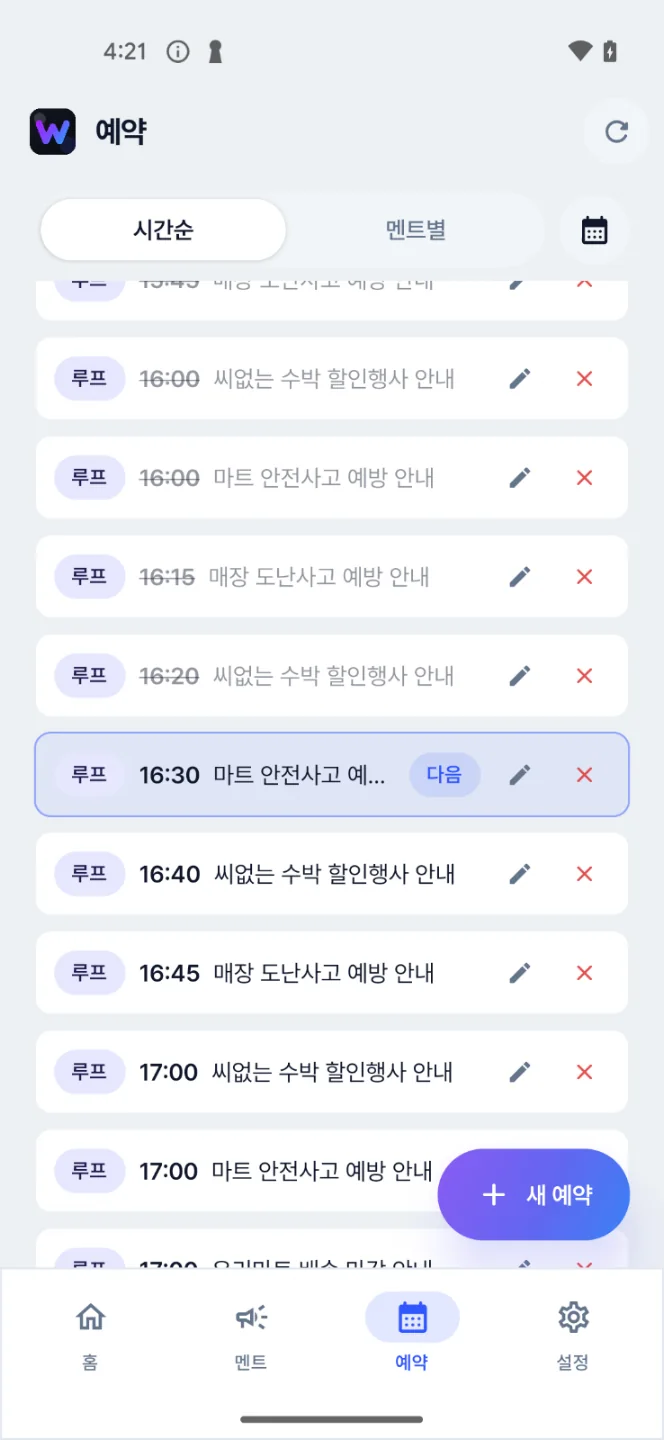
Hanaro Mart airs a variety of announcements on repeat at minute intervals every day — deals, event news, and community info. It's optimized for mart announcements.

Gwangmyeong Cave

Gwangmyeong Cave

Gwangmyeong Urban Corporation

Gwangmyeong Cave sets daily schedules for regular announcements. As a tourist site with many foreign visitors, it also provides English announcements and on-demand broadcasts as needed.

Doosan We've The Zenith

Doosan We've The Zenith

Apartment announcements

Broadcast all kinds of apartment announcements with crystal-clear pronunciation in a single click. If you currently use microphone announcements, try it right now! Experience apartment announcements on a whole new level.

Changwon Football Center Gym

Changwon Football Center Gym

Changwon Facilities Corporation

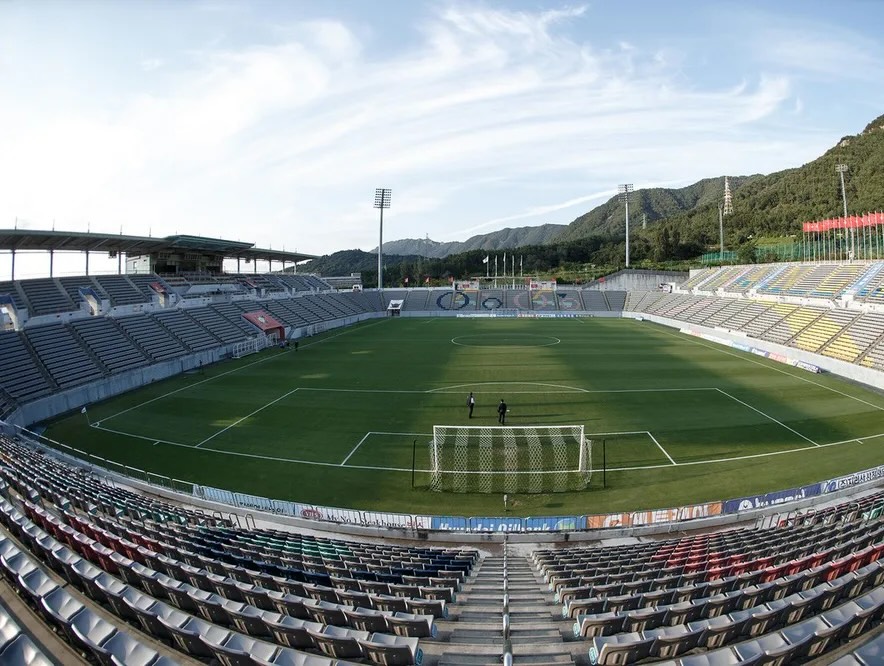
Announcements deliver warm-ups, etiquette, and safety rules so citizens can use the facility safely and comfortably. They play a key role in preventing accidents and creating an orderly environment.

Cafe Astana

Cafe Astana

Cafe announcements

It schedules regular notices and instantly pages customers for completed orders. With the upgraded broadcasts, the cafe was reborn as a more refined, premium space — cafe announcements that let even a cafe sound high-end.

POPMART

POPMART

Multilingual store guidance

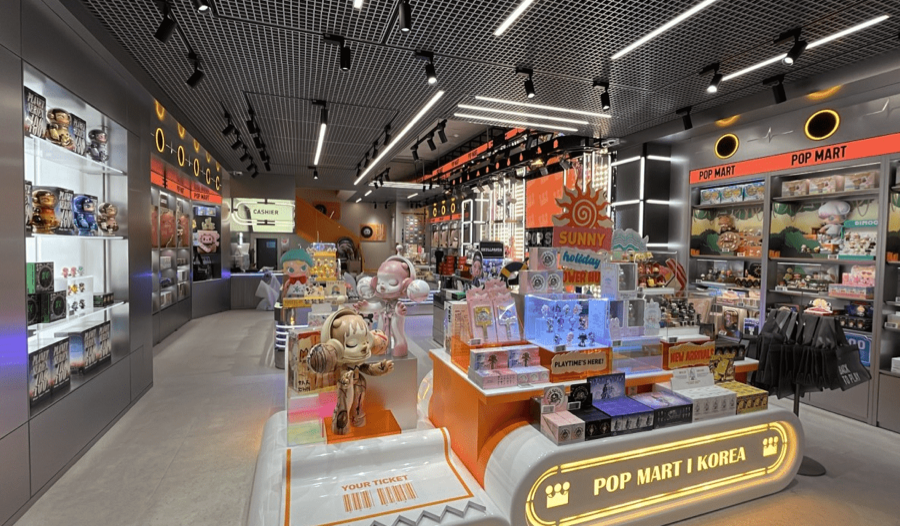
It runs back-to-back announcements in Korean, English, Japanese, and Chinese covering what domestic and overseas customers need to know.

Ulleung Cruise

Ulleung Cruise

Pier announcements

At the pier, the announcement service quickly and accurately delivers boarding times and urgent notices such as weather changes and sailing delays — an essential tool for smooth operations and passenger safety.

PRICING

From ₩29,700 a month. Free for a month, no card required.

Starter ₩29,700 · Business ₩43,890 · Premium ₩152,700 — per month on annual billing, tax invoices available

Announcements in use at a care facility
CARE FACILITY

Nursing homes and nursing hospitals use it conveniently too.

It provides a systematic, reliable broadcast system — from everyday notices like meal times, program guidance, and visit reminders to emergencies.

Care facility client logo 1
Care facility client logo 2
Care facility client logo 3
Care facility client logo 4
Care facility client logo 5
Care facility client logo 6

App tour · 0:43

From one line of textto an in-store announcement.

Describe the situation and AI writes the announcement. Set a time and it plays through your store speakers at that time every day. Lots of international visitors? It follows up in several languages.

We start with the device you're viewing on.

9:02
Message
AllStore noticesEventsUncategorised

Pinned

Parking notice

The parking lot is crowded, so please use public transportation.

General

Special sale

Our fresh food section is running a one-day special sale right now. Don't miss it.

Safety announcement

In a fire or other emergency, please stay calm and follow staff instructions to evacuate.

HomeMessageScheduleSettings
From a photoFrom a flyer or notice By typingType it, AI writes it By voiceSay it, AI writes it
Add messageClose
9:02
9:02
Message

General

Special sale

Our fresh food section is running a one-day special sale right now. Don't miss it.

Safety announcement

In a fire or other emergency, please stay calm and follow staff instructions to evacuate.

HomeMessageScheduleSettings
CancelNew messageCustom
Write an announcement with AI

Say or type the situation and we'll write the announcement.

What do you need to announce?

Notice 10 min before closing at 10 p.m.

Dictate
Got a flyer or a printed notice?Take a photo and we'll turn it into an announcement

Tone

PoliteFriendlyConciseUrgent
Draft it with AI Writing…
9:02
9:02
Message

General

Special sale

Our fresh food section is running a one-day special sale right now. Don't miss it.

Safety announcement

In a fire or other emergency, please stay calm and follow staff instructions to evacuate.

HomeMessageScheduleSettings
CancelNew messageSave

Basics

Message titleClosing time notice
CategoryUncategorised

Script

Attention, shoppers. We will be closing at 10 p.m. shortly. If you haven't checked out yet, please come to the checkout counter. Thank you for visiting today.

Type {3} between sentences for a 3-second pause.

Voice

VoiceMinseo · Standard announcer
Speech rateNormal−+
9:03
9:02
Message

General

Closing time notice

Attention, shoppers. We will be closing at 10 p.m. shortly. If you haven't checked out yet, please come to the checkout counter. Thank you for visiting today.

Special sale

Our fresh food section is running a one-day special sale right now. Don't miss it.

Safety announcement

In a fire or other emergency, please stay calm and follow staff instructions to evacuate.

HomeMessageScheduleSettings
CloseMessage

Closing time notice

ChimeMinseo · Standard announcer
Multilingual announcementsAdd a language and we translate it and announce them in order

Attention, shoppers. We will be closing at 10 p.m. shortly. If you haven't checked out yet, please come to the checkout counter. Thank you for visiting today.

This is your broadcast device. Announcements play through the speakers connected to it.

Broadcast
PreviewSchedule it
9:03
9:02
Message

General

Closing time notice

Attention, shoppers. We will be closing at 10 p.m. shortly. If you haven't checked out yet, please come to the checkout counter. Thank you for visiting today.

Special sale

Our fresh food section is running a one-day special sale right now. Don't miss it.

Safety announcement

In a fire or other emergency, please stay calm and follow staff instructions to evacuate.

HomeMessageScheduleSettings
CloseNew scheduleSave schedule
LoopOnceWeeklyMonthly
Message to broadcastClosing time notice

Schedule

Start dateToday
Time9:00 AM9:50 PM
AMPM 7891011 4849505152
Set end date

Repeat on

SunSun Mon Tue Wed Thu Fri SatSat
9:03
Schedule
By timeBy message

3 scheduled today

Loop10:00Opening notice
Once14:00Parking notice
Weekly21:50Closing time noticeNext

Upcoming

Closing time notice

Every day · 21:50

Next · today 21:50

New schedule
HomeMessageScheduleSettings
Schedule saved
9:499:50

Hello

KimThis device · broadcast device

Next automatic broadcast

in 0:03in 0:02in 0:01Closing time notice

Today 21:50

Broadcast now

On air

Closing time notice

Today 21:50 · scheduled

Stop broadcast

Next automatic broadcast

Tomorrow 21:50Closing time notice

Every day · 21:50

Broadcast now
Quick broadcast
Closing time noticeParking noticeSafety announcement
Today's broadcasts
21:50Closing time noticeWeekly
Recently played
21:50Closing time noticeSuccess
Closing time noticeOn air
HomeMessageScheduleSettings
9:50
9:02
Message

General

Closing time notice

Attention, shoppers. We will be closing at 10 p.m. shortly. If you haven't checked out yet, please come to the checkout counter. Thank you for visiting today.

Special sale

Our fresh food section is running a one-day special sale right now. Don't miss it.

Safety announcement

In a fire or other emergency, please stay calm and follow staff instructions to evacuate.

HomeMessageScheduleSettings
CloseMessage

Closing time notice

ChimeMinseo · Standard announcer
Multilingual announcementsAdd a language and we translate it and announce them in order

Attention, shoppers. We will be closing at 10 p.m. shortly. If you haven't checked out yet, please come to the checkout counter. Thank you for visiting today.

This is your broadcast device. Announcements play through the speakers connected to it.

Broadcast
PreviewSchedule it
9:50
9:02
Message

General

Closing time notice

Attention, shoppers. We will be closing at 10 p.m. shortly. If you haven't checked out yet, please come to the checkout counter. Thank you for visiting today.

Special sale

Our fresh food section is running a one-day special sale right now. Don't miss it.

Safety announcement

In a fire or other emergency, please stay calm and follow staff instructions to evacuate.

HomeMessageScheduleSettings
CancelAdd language
Japanese日本語
Chinese中文
Korean한국어
VietnameseTiếng Việt
SpanishEspañol
Fill it in with a translation

2 AI translations used this monthTranslating Japanese…Translating Chinese…Translating Korean…

Translate and add (0123) Translating…
9:50
9:02
Message

General

Closing time notice+1

Attention, shoppers. We will be closing at 10 p.m. shortly. If you haven't checked out yet, please come to the checkout counter. Thank you for visiting today.

Special sale

Our fresh food section is running a one-day special sale right now. Don't miss it.

Safety announcement

In a fire or other emergency, please stay calm and follow staff instructions to evacuate.

HomeMessageScheduleSettings
CloseMessage

Closing time notice

ChimeMinseo · Standard announcer
Languages to announceAdd language
All languagesEnglishJapaneseChineseKorean

4 languages will play one after another

Attention, shoppers. We will be closing at 10 p.m. shortly. If you haven't checked out yet, please come to the checkout counter. Thank you for visiting today.

This is your broadcast device. Announcements play through the speakers connected to it.

BroadcastStop broadcast
PreviewSchedule it
0:00 / 0:43

Swipe the screen for the next step

AI ASSISTANT

Announcements — now AI helps.

Don't worry about complex wording or foreign-language translation. Experience announcements finished in just seconds.

Anyone can write a script in 3 seconds

Translate into many languages at once

NEW LAUNCH

In-Store Music Broadcasting

In stores, hospitals, cafes, malls — anywhere — pick a music channel that fits the mood and air it automatically alongside scheduled announcements. When a broadcast starts, the music lowers naturally and resumes when the announcement ends.

01

Music channels across genres

Choose to match your industry and mood — latest hits, ballads, classical, and even seasonal and themed channels.

02

Music auto-play schedule

Set a schedule to turn music on and off at the times you want, and auto-play closing music before business hours end.

03

Announcements and music together

When an announcement plays, the music volume lowers smoothly and resumes when the announcement ends.

#Cafe BGM selection#Cozy music for cafes#Lo-fi for focus #Standard jazz classics#Japanese city pop vibes#Relaxing piano melodies #Deep-sleep playlist#Gentle music for sleep#Piano #Calm music#Classical#Chuseok special#Christmas special#Themed channels

AI Music MakerBeta

Type your store name. It becomes the chorus.

Pick your business type and mood, and AI writes the lyrics and sings the song. Each run gives you two candidates, and the one you like can be registered as a broadcast right away.

Try typing your own
Music only, no lyrics
[Chorus]

Happy mornings start at Miso Bakery
Fresh-baked days, always Miso Bakery

[Intro]

We've got good news,
Miso Bakery

Instruments

Acoustic guitar, piano, strings

It's instrumental, so it can play under your announcements.

  • Cafe · bakery
  • Acoustic folk
  • Warm & cozy
  • 1 min
  • Cafe · bakery
  • Acoustic folk
  • Bright & cheerful
  • 30 sec
  • Cafe · bakery
  • Acoustic folk
  • Calm & relaxing
  • 2 min
Candidate 1 1:02
Candidate 2 1:02
Candidate 1 0:31
Candidate 2 0:29
Candidate 1 1:53
Candidate 2 2:03

Tap Register as broadcast ment on the one you like and it goes straight to the top of your broadcast list.

With Use as background music, play it under the whole broadcast or just briefly at the start and end.

The songs you hear are samples made for “Miso Bakery” and sung in Korean. For your store, AI writes new lyrics and music.

A neighborhood bakery owner arranging bread while getting ready to open in the morning
Try the music maker

During the beta, features and allowances may change. Tracks are labeled as AI-generated, and commercial use such as in-store broadcasting is permitted. Registering songs as broadcasts and adding them as background music are available from the Business plan.

MUSIC APP INTEGRATION

Broadcast in sync with the music app you already use.

It automatically adjusts your music app's volume when an announcement airs. Integrate with various streaming services to build a professional broadcast system. * WeMakeVoice installer required

YouTube logo
YouTube Music logo
Melon logo
Spotify logo
Genie Music logo
Construction sites · safety managers

Construction-site safety broadcasts, automatic and matched to the feels-like temperature.

Safety managers no longer have to check the temperature and grab the mic each time. Set the site's region and broadcast times, and it checks the weather service's observation data and automatically airs heat-wave safety scripts matched to the feels-like-temperature level through the on-site speakers.

  • ✓See the selected site's temperature, humidity, and hourly forecast at a glance
  • ✓Safety scripts and rest guidance for feels-like levels of 31, 33, 35, and 38°C
  • ✓Auto-broadcasts at 1- or 2-hour intervals; warning and danger levels can require approval before airing
A construction-site safety manager checking automatic safety broadcasts matched to the weather service's feels-like temperature Weather auto broadcast · running
Current feels-like temp 34.8°C
Current level Caution
Next broadcast 14:00 auto
01 Set the site region and times

Choose the city/county/district and broadcast interval, and pick the safety scripts that fit the site.

02 Auto-check weather-service data

At each set time, it checks the latest temperature and humidity to calculate the site's feels-like temperature and level.

03 Air the AI broadcast for that level

The current feels-like temperature and guidance to rest or pause work are broadcast automatically in a clear AI voice.

Here's what happens now

Set it up once and it plays on its own, on schedule every day.

Pick a voice, set the script, and schedule the time — WeMakeVoice handles the rest. Lunch notices, closing notices, seasonal events — all aired precisely, at the same time and in the same tone, every day.

60 seconds
Just once

From AI script writing to scheduling, in just 60 seconds

Pick a voice, enter a few keywords, and AI writes the script and reads it aloud. Just set the airing time and you're done — the whole process takes 60 seconds, and your first broadcast plays.

On schedule daily
Auto airing

At the set time, without fail

Schedule daily broadcasts like lunch, closing, and shift-change notices just once, and they go out the same way at the exact time even when no one's there.

984
WeMakeVoice

Every space suits a different voice

Warm for a cafe, clear and measured for a nursing home, lively for a mart. Choose from 984 AI voice actors and 40 languages, and announce in the tone that fits your space.

Where it's used

Different industries, the same challenge.

Recycling notices at an apartment office, order calls at a cafe, meal notices at a nursing home
Only the names differ — they're all 'broadcasts that repeat every day.'
We've gathered stories from places that handed that job to WeMakeVoice. Find the card that most resembles your space.

Apartment complex office

Manager · security office

Resident notices, parking guidance, recycling days, pest-control schedules. Set it once to air automatically by building and time slot.

"Even quarterly broadcasts like fire-drill and routine pest-control notices — just put them on the calendar and you're done."

Cafe / bakery

Owner · manager

Order calls, closing notices, seasonal promotions flowing with BGM — in a calm tone that doesn't disrupt the store's atmosphere.

"We swapped buzzers for a voice that warmly calls customers by name, and the whole mood changed."

Nursing home / day care

Director · social worker

Meal notices, medication times, program starts — in a slow, senior-friendly voice that's clear and easy for elders to understand.

"The same staff member used to grab the mic and shout every time; now we spend that time with the residents."

Small-to-mid mart / convenience store

Owner · store manager

Deal announcements, stock alerts, one-hour-to-close notices. The broadcasts never get missed, even with just one or two staff.

"Even late at night with a single staff member, the scheduled broadcast goes out precisely every 30 minutes."

Government office / public facility

Civil service desk · facility management

Service-desk guidance, hours, government standard scripts, emergency notices — the info visitors hear most, in a consistent tone.

"The time desk staff spent on the mic is gone, so they can focus on their actual work."

National park / tourist site / cave

Visitor center · management office

Trail guidance, safety cautions, multilingual announcements — Korean, English, Chinese, and Japanese blend naturally in one script.

"We have many foreign visitors, and after automatic four-language broadcasts, info-desk inquiries dropped by half."

Clinic / pharmacy

Administration · pharmacist

Queue-number calls, appointment guidance, prescription pickup alerts — precisely, using anonymous numbers without exposing patient names.

"We switched to a clear, easy-to-hear voice for elderly patients, and missed calls disappeared."

Gym / studio

Owner · trainer

Five-minutes-to-class notices, closing notices, membership info — so trainers can focus on class.

"With class-start alerts going out precisely, late arrivals dropped by 30%."

And more — every space

Internet cafes · salons · academies · gas stations · museums …

Anywhere there's "the same announcement at the same time every day." Sign up and your first broadcast plays in 5 minutes.

"If the script is fixed, there's no reason for a person to shout it."

PRODUCT DETAILS

A closer look at the features announcements need.

Announcements go out on schedule by themselves, messages are easy to make, and every broadcast is logged automatically.

  1. Set the date and time once, and the announcement plays by itself every time. Nothing is missed, even when no one is around.

    • One-time
    • Chosen weekdays
    • Same day monthly
  2. Just set the start time, end time and interval, and the same message keeps repeating in between. Ideal for events and sales you need to announce often.

    • Every 10, 30, 60 min…
    • Set an end time
    • Pick weekdays
  3. Link announcements so English, Chinese and Japanese versions play one after another once the Korean one ends. Scheduled broadcasts follow the same chain.

    • Languages back to back
    • Works in schedules too
  4. Check schedules by date on the calendar, and edit or delete them right there.

    • Monthly view
    • Holidays shown
    • Edit or delete in place
FEATURES

Everything in broadcast operations, on one screen.

Scheduling · repeats · follow-ups

Schedule once, automatic forever.

Daily 11:30 lunch notice, Tue/Thu 14:00 event notice, a 30-minutes-before alert + a just-before alert + an ending-soon alert — register them as one bundle and you're done.

Daily · weekday · date · period Register any pattern.
Automatic follow-up broadcasts — Bundle and schedule follow-up scripts like "closing in 30 minutes."
Pause · auto-skip holidays — Automatically skips public holidays and days off.
Broadcast log — Records which script aired and when.
Today's schedule
09:00 Opening greetingDaily repeat · business days ● Done
11:30 Lunch-time noticeDaily 11:30 · whole store ● Done
14:55 30% off fresh foodEvery Fri · follow-up 15:25 ending soon ● Airing
15:25 Sale ending soon14:55 follow-up · auto ↻ Follow-up
17:00 2 hours to closeDaily 17:00 · whole store ● Waiting
19:50 Closing noticeBusiness days 19:50 · whole store ● Waiting
AI script assistant · captions · multilingual

"Write a script for 30% off iced drinks for summer."

Ask in one line and a natural announcement script comes out — auto-translated into other languages, with captions for digital signage included.

AI script assistant — Just set the tone (friendly/formal/urgent) and length, and scripts are written automatically.
Auto-translation — One script in Korean, English, Chinese, and Japanese at once — perfect for places with many foreign customers.
AI script assistant
YOU Make a 25-second script in a friendly tone for 30% off iced drinks this summer.
WeMakeVoice AI
"Hello, valued customer. On this hot summer day, why not cool off with a refreshing iced drink? For one week starting today, all iced menu items are 30% off. Order a cup full of cool refreshment at the counter now."
🇰🇷 Korean 🇺🇸 English 🇨🇳 Chinese 🇯🇵 Japanese Captions ↓ SRT
Connect Broadcast Equipment

Just use the speakers your store already has.

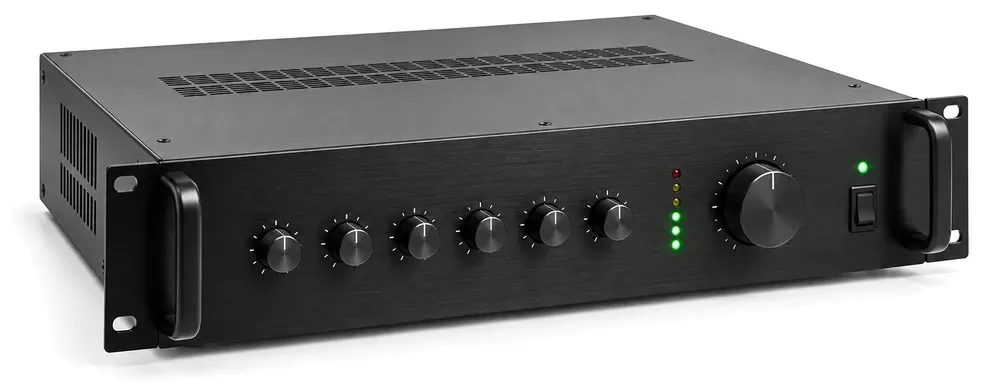
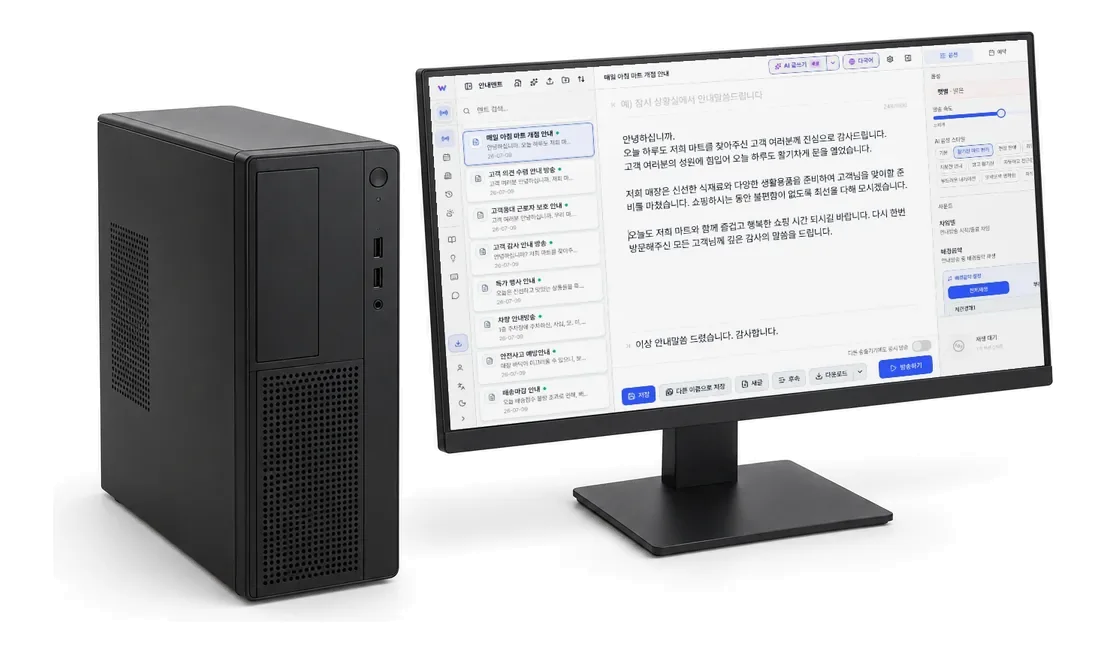
Just connect your computer's audio output to an external input such as AUX on your existing PA amp. If the equipment is nearby and you can preview through a monitoring panel, a single cable is enough.

Cable only — When the equipment is nearby and has a monitoring panel.
Selector trial kit — When the equipment is far away or there's no way to preview.
Preparing for scheduled broadcasts — Keep the equipment always on and first check for noise.
See the connection method for my setup
📱
Operator

Write scripts on web or app

→
☁
WeMakeVoice cloud

AI voice generation · schedule management

→
🔊
Store speakers

Broadcast box / PC / mobile

Compatible with the PA system your store already has. As long as the internet's connected, you're good.

Connect existing broadcast equipment

Keep your existing amp and speakers — just connect and go.

No new equipment needed. Send your PC's sound into your PA system with a cable and it plays straight through your store speakers.

The method most stores use · No selector needed

If the equipment is nearby, a single cable is all you need.

Store speakersPA amplifierCounter PC
Counter PCPA amplifierStore speakers
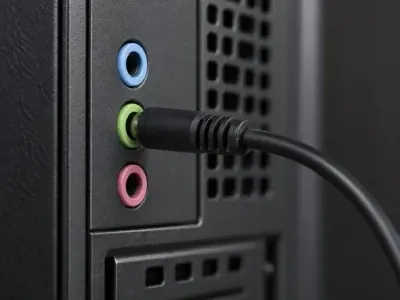
  1. 1 Plug into the green jack on the back of the PC

    That's the speaker (headphone) output. On a laptop or tablet, just use the headphone jack.

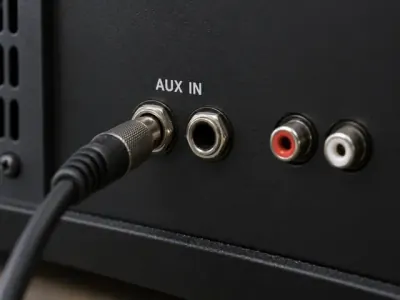
  2. 2 Plug into the AUX input on the back of the amplifier

    It's an external input such as AUX or LINE IN. If there isn't one, an unused CD or TAPE input may also work, depending on the equipment.

  3. 3 It plays right through your store speakers

    No need to touch the speaker wiring. To check before broadcasting, just listen to what comes out of the store speakers.

1-month free trial + connection parts request

The trial is free. If your computer and broadcast equipment are already connected, or you don't need any parts, start right away at no cost. You can select the parts you need when you apply, and part costs are not charged during the trial. They are billed only if you continue with the service after the trial — if not, simply return the parts as received.

No parts Your computer and broadcast equipment are already connected, or no parts are needed
Cable set Noise filter + cable · Shipping included
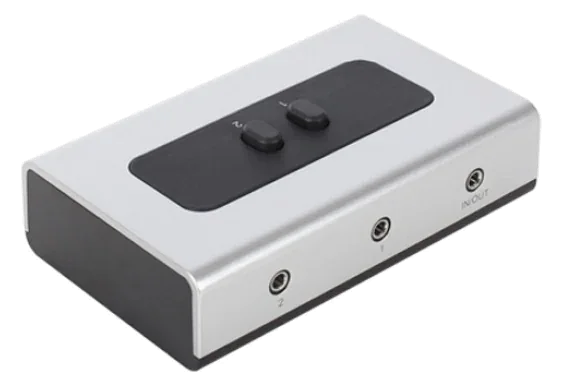
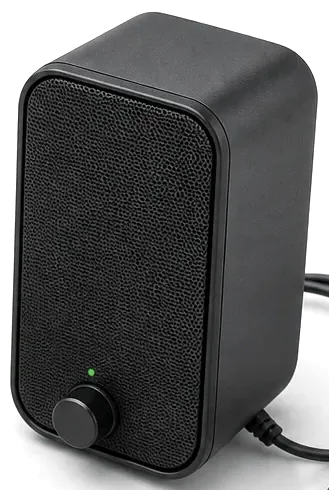
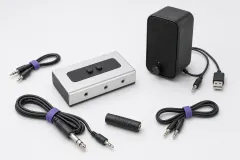
Selector installation kit 2-button selector, small speaker, cables, noise filter · Shipping included
Apply for the 1-month trial & kit

On-site ports and kit contents may vary depending on your equipment model. After you apply for the trial, we'll review photos of your equipment and guide you to the right connection method.

VOICES

984 AI voice actors. 40 languages.

Matched to your store's mood — warm, firm, calm, friendly. Including senior-friendly voices, children's voices, and native foreign-language voices.

Choose a language
Tap a voice to listen
Sample announcement Attention, shoppers. Our fresh food time sale starts at three p.m. today. Thank you for shopping with us.
40 languages · partial
KoreanEnglish (US)English (UK)中文 (简体)中文 (繁體)日本語 EspañolFrançaisDeutschItalianoPortuguêsРусский Tiếng ViệtภาษาไทยBahasa Indonesiaहिन्दीالعربية+ 23 more
PRICING

Enough if you run a single location.

Start free with no credit card.

1-month free trial — Start without registering a card, and the trial ends automatically. No payment pressure.
Start for Free
Starter
37,20029,700KRW / month
Basic announcements for a single store.
  • 200 announcements/month
  • 984 professional voices worldwide
  • 60 script templates
  • 12 background tracks · 30 previews/day
  • Broadcast report export · live remote support
Get Started with Membership
Premium
254,500152,700KRW / month
For headquarters running multiple branches.
  • Everything in Business
  • Manage 3 branches (centralized at HQ)
  • Additional accounts available
  • 200 AI translations/month · 3 weather rules
  • 40 background tracks · 100 previews/day
Get Started with Membership

Prices shown are based on annual billing · Up to 40% off · Tax invoices available

CUSTOMER REVIEWS

You can already hear WeMakeVoice in many places.

Proven at a range of businesses, knowledge-industry centers, government offices, apartments, and care facilities.

Seoulsan Boram Hospital Park Seong-gyu, IT Manager

As someone running scheduled broadcasts twice a day, staff and customer satisfaction rose after we started using WeMakeVoice announcements. We're quite satisfied so far and expect to keep using it.

Atomy Co., Ltd. Yoon Jin-woo, Education Operations Division, BizLab

We run four seminar events a month that each draw over 3,000 people, and being able to deliver announcements with high-quality diction and a voice character suited to the situation in such crowded venues has been a huge help in running the seminars. On top of that, some of our attendees come from overseas, so we need announcements in foreign languages, and being able to broadcast in languages other than Korean is extremely useful. WeMakeVoice has taken a big worry off the shoulders of our seminar staff.

Dosi Integrated Management Co., Ltd. Kim Won-il, Mechanical & Electrical Manager at Blue City

After we started using WeMakeVoice announcements for our in-house broadcasts, the residents responded more positively and our staff's difficulties were resolved. We're satisfied with the price, and it's easy to operate and convenient to use. Since it solves all the drawbacks of live voice announcements, I think it would be great if our other branches used it too. Thank you.

Seongpo Jugong Complex 11 Management Office Kim Hyang-eun, General Affairs

Since we started using WeMakeVoice announcements, the pressure of broadcasting has greatly decreased, and writing announcement scripts is so simple and easy that our work has become noticeably more comfortable.

ENTERPRISE / CHAIN

If you have multiple stores, we'll help separately.

If you're a franchise, chain, or corporate operations team that needs to air to 100 or 500 locations at once from a single HQ screen, we offer a separate Enterprise plan.

Talk to us about Enterprise →
Simultaneous multi-branch airingHQ → all branches at once. Separate airing by region or group, too.
Per-branch broadcast reportsDaily and monthly airing status and failure alerts consolidated at HQ.
Permission managementSeparate permissions for HQ, regional managers, and store managers. Store managers view only.
API · internal system integrationIntegrate with POS and ERP to trigger automatic airing.
Dedicated managerDedicated staff for onboarding, operations, and scaling.
Quarterly settlement · SLATax invoices and a 99.95% SLA guarantee option.
Announcements by industry

Which announcements does your business need?

Every industry relies on different announcements. Here are ready-to-use scripts and how to run them.

Grocery stores & supermarkets

Flash sales, closing notices, and lost-and-found announcements go out automatically on schedule, even when the checkout line is packed.

Apartments & residential buildings

Recycling, water outage, and parking notices play through your existing PA system. The management office never has to pick up a microphone.

Hospitals & care homes

Waiting-room, visiting-hour, and infection-prevention notices in a calm voice, with the same quality at night and on weekends.

Schools & academies

Schedule class bells, pick-up and drop-off notices, and exam announcements to match your timetable.

Unmanned stores & cafés

Greetings, usage guides, and closing notices without staff. Music keeps playing and only dips while an announcement runs.

Factories & construction sites

Heat-wave and cold-snap safety announcements trigger automatically from the weather service's feels-like temperature, with multilingual versions for foreign workers.

FAQ

Before you sign up — frequently asked questions.

Do I need to buy separate equipment for my store?

Usually not. Use the PA amplifier and ceiling speakers your store already has, install the program on your counter PC, and it airs immediately. Older public-address systems work the same way and can be used as-is, and small spaces like cafes are fine with just PC speakers. If your equipment is aging or you need separate airing across multiple zones, we recommend the Premium plan's dedicated broadcast box (rental).

How do I connect my broadcast equipment to a computer?

Simply connect your computer's speaker output to an external input on the broadcast equipment, such as AUX, CD, or TAPE. If the equipment is nearby and you can preview through a monitoring panel, a cable is all you need. If the equipment is far away or there is no monitoring panel, you can request the connection kit — a selector, small speaker, noise filter, and cables — when applying for the 1-month trial. To use scheduled broadcasts, the equipment must stay on at all times.

See the connection guide with pictures →
If the internet drops briefly, does the broadcast stop?

Scheduled broadcasts are pre-downloaded to the broadcast box and air normally even if the internet drops. When the connection is restored, broadcast logs sync to the cloud automatically. Only instant airing (live scripts) requires an internet connection.

Can I use it alongside the music (BGM) playing in my store?

Yes. You can integrate with other music programs or use the WeMakeVoice BGM library. When an announcement starts, the BGM lowers automatically and rises again when the script ends (auto-ducking).

We have many foreign customers — is multilingual guidance possible?

Yes. One script is auto-translated into Korean, English, Chinese, and Japanese, so you can create multilingual announcements where English follows Korean, and so on. We support 40 languages with natural, native-level voices.

Will I be billed automatically after the free trial?

No. The free trial starts without registering a card and ends automatically after one month. To keep using it, simply choose a paid plan yourself. You can try it with confidence and no payment pressure.

How do I confirm a broadcast aired correctly?

Broadcast logs are recorded automatically. You can see which script aired at what time and from which IP it was played.

Where can I use it?

It's used in all kinds of spaces that need announcements — apartments and officetels, buildings, hospitals and nursing hospitals, malls and marts, unmanned stores, government offices, piers, campsites, cafes, and more. Apartments and officetels can broadcast without issue by connecting to existing public-address equipment.

Can I run multiple stores (branches) from one account?

One account is built around running a single location. To run several stores centrally from headquarters, we recommend the Premium membership (3 stores including HQ). If you have more stores, please contact customer support.

How much does it cost?

Choose a plan that matches your usage; an annual plan saves you up to 40%.

See membership pricing →
Can I pay as a business (with a tax invoice)?

Yes. We support a range of payment methods — credit, debit, and corporate cards, bank transfer, auto-debit, and PayPal — and offer monthly or annual electronic tax invoices and bank-transfer payment. Annual billing saves up to 40%.

WeMakeVoice

The surest way is to just try it.


This site is protected by reCAPTCHA and the Google Privacy Policy and Terms of Service apply.