Pick a voice, drop in text — done. WeMakeVoice Anyone in 5 minutes.
No complex setup, no recording gear. Choose from 984 voices, paste your script, and out comes an MP3 ready for ads, YouTube, textbooks, and audiobooks.


















Just three steps to your voice.
This is the screen the moment you sign up. Pick a voice, paste your text, and you get an MP3 ready for ads, YouTube, textbooks, and audiobooks. Nothing to learn, nothing to install.
Pick a voice
Preview 984 voices and tap the one you like. Ads, narration, characters, reading aloud — there's a voice for every use.
Drop in text
Just paste the text to be read. Long scripts or last-minute changes? Re-enter it on the spot and you're done. Tone and speed are a single slider away.
Download file
One button and your MP3 downloads. A commercial license is included, so use it directly in ads, broadcasts, and content.
What will the voice be used for?
Real samples we made for each use. Press play to listen, and if you like one, make yours with the same voice, tone, and music.
-
Ads & promotional videos
Narration for store promos and product videos with no voice-actor booking. Preview everything from bright tones to trustworthy low voices.
VoiceAlgenib TonePremium brand MusicAI music · Orchestral · cinematic Script
ScriptGood furniture grows more beautiful with time. Shaped by the hands of a craftsman who has worked with a single wood for thirty years. We make homes you'll want to stay in.
-
Voice StudioPick voice & tone
- Voice
- Algenib
- Tone
- Ads & promotionPremium brand
-
AI Music MakerMake the music
- Make
- Free creationMusic only, no lyrics
- Genre
- Orchestral · cinematic
- Mood
- Luxurious
- Tempo
- Slow
- Instruments
- PianoStrings
- Length
- 30 sec
- Extra direction
- Background music for a solid-wood furniture brand ad. A narration sits on top, so keep the melody simple and spacious. Set the mood from the start and end softly.
-
Audio MixerCombine voice and music
- Template
- Advertisement
- Background music
- Volume 50%
- Voice first
- On
-
-
Education & lecture videos
Upload a PPT and every slide becomes a lecture video with narration and subtitles. Even long lectures can be edited sentence by sentence.
VoiceCharon ToneLecturer + Longer pauses MusicAI music · Lo-fi · chill Script
ScriptToday, we'll look at photosynthesis. Plants make their own food from sunlight, water, and carbon dioxide. There are two key points to remember. First, light is required. Second, oxygen is released as a result.
-
Voice StudioPick voice & tone
- Voice
- Charon
- Tone
- Education & explanationLecturer
- Quick adjust
- Longer pauses
-
AI Music MakerMake the music
- Make
- Free creationMusic only, no lyrics
- Genre
- Lo-fi · chill
- Mood
- Calm & relaxing
- Tempo
- Slow
- Instruments
- Piano
- Length
- 30 sec
- Extra direction
- Background music for a science lecture video. Quiet and steady so the explanation stays clear, with no sounds that stand out. A bright mood that helps focus.
-
Audio MixerCombine voice and music
- Template
- Simple BGM Mix
- Background music
- Volume 50%
- Voice first
- On
-
-
Phone IVR & ring-back tones
Turn your greeting into an audio file and hand it to your carrier. Mix in background music for a ring-back tone that is uniquely yours.
VoiceVindemiatrix ToneFriendly service agent Script
ScriptHello, and thank you for calling our appointment center. We're committed to providing the best medical care for your health. An agent will be with you shortly, so please stay on the line. We'll do our best to book your visit quickly and accurately. Thank you.
-
Voice StudioPick voice & tone
- Voice
- Vindemiatrix
- Tone
- Business & guidanceFriendly service agent
-
-
Global voices in 80 languages
English, Japanese, Chinese — natural as a native speaker. The speaker switches naturally even in sentences mixing Korean and English
VoiceKore ToneAirport announcement MusicAI music · Ambient · Nature Script
Script안녕하세요, 서울에 오신 것을 환영합니다. Welcome to Seoul. ようこそ、ソウルへ。 欢迎来到首尔。 Chào mừng bạn đến Seoul.
-
Voice StudioPick voice & tone
- Voice
- Kore
- Tone
- Business & guidanceAirport announcement
-
AI Music MakerMake the music
- Make
- Free creationMusic only, no lyrics
- Genre
- Ambient · Nature
- Mood
- Calm & relaxing
- Tempo
- Slow
- Instruments
- Synth padGayageum (Korean zither)
- Length
- 30 sec
- Extra direction
- Background music for an airport arrival announcement. A clear, calm feeling that welcomes people to Seoul, with space so the announcement voice stays crisp.
-
Audio MixerCombine voice and music
- Template
- Simple BGM Mix
- Background music
- Volume 50%
- Voice first
- On
-
-
YouTube & short-form
Paste a script and get the voice with subtitles. Especially popular with faceless channels.
VoiceFenrir ToneShorts & Reels hook + Fast + Snappy MusicAI music · Hip-hop · funk Script
ScriptWait, you don't want to miss this! One bowl of leftover rice, five minutes, and fried rice is done. Heat the pan until it smokes, and always use cold rice. Do just this, and it tastes like a real restaurant.
-
Voice StudioPick voice & tone
- Voice
- Fenrir
- Tone
- Video & YouTubeShorts & Reels hook
- Quick adjust
- FastSnappy
-
AI Music MakerMake the music
- Make
- Free creationMusic only, no lyrics
- Genre
- Hip-hop · funk
- Mood
- Fun & playful
- Tempo
- Normal
- Length
- 30 sec
- Extra direction
- Background music for a cooking short. Under fast talking, keep the rhythm lively and the melody simple. Start right on the first beat.
-
Audio MixerCombine voice and music
- Template
- Simple BGM Mix
- Background music
- Volume 50%
- Voice first
- On
-
-
Listening tests & exams
Create audio in varied accents and tones, finely adjust the gaps between clips from 0.1 seconds to 60 minutes, and fit an entire test session into a single file. Speed, tone, and volume can all be precisely refined.
VoiceGacrux ToneExam question reading Script
ScriptQuestion 1. Listen and choose the main purpose of the woman's talk. Hello, everyone. This is Grace Miller from the Riverside Public Library. Starting next Monday, the library will stay open until nine p.m. on weekdays. We're also starting a free evening reading club for adults. If you'd like to join, please sign up at the front desk or on our website. We hope to see you there.
-
Voice StudioPick voice & tone
- Voice
- Gacrux
- Tone
- Education & explanationExam question reading
-
-
Audiobooks & readings
Long texts in 5,000-character batches. Adjust the pause between sentences for a reading that is easy on the ears.
VoiceSulafat ToneAudiobook novel + Richer MusicAI music · New age · Piano Script
ScriptThat night, the first snow fell on the village. The girl pressed her forehead to the window and whispered, “Grandma, it’s snowing.” A low, warm voice answered from the kitchen. “Yes, it came early this year.”
-
Voice StudioPick voice & tone
- Voice
- Sulafat
- Tone
- Story & readingAudiobook novel
- Quick adjust
- Richer
-
AI Music MakerMake the music
- Make
- Free creationMusic only, no lyrics
- Genre
- New age · Piano
- Mood
- Warm & cozy
- Tempo
- Slow
- Instruments
- PianoMusic box
- Length
- 30 sec
- Extra direction
- Background music for an audiobook story about a night of first snow. Cozy and hushed, very soft so it never covers the reading.
-
Audio MixerCombine voice and music
- Template
- Simple BGM Mix
- Background music
- Volume 50%
- Voice first
- On
-
-
Guidance voices & kiosks
Guidance voices for stores, exhibitions, and kiosks in 80 languages, so every visitor hears the same message in their own language. QR audio guide
VoiceErinome ToneFriendly service agent + Longer pauses MusicAI music · Bossa nova Script
ScriptWelcome! I'll help you with your order. Choose what you'd like on the screen, then tap the Pay button at the bottom right. Please insert your card into the slot below.
-
Voice StudioPick voice & tone
- Voice
- Erinome
- Tone
- Business & guidanceFriendly service agent
- Quick adjust
- Longer pauses
-
AI Music MakerMake the music
- Make
- Free creationMusic only, no lyrics
- Genre
- Bossa nova
- Mood
- Bright & cheerful
- Tempo
- Normal
- Length
- 30 sec
- Extra direction
- Background music for a cafe ordering kiosk guide. Welcoming and fresh, light enough never to stand out over the guide voice.
-
Audio MixerCombine voice and music
- Template
- Simple BGM Mix
- Background music
- Volume 50%
- Voice first
- On
-
More TTS guides → Need a voice on video? Try video dubbing →
Screens you'll touch within a minute of signing up.
Real product screens. Every feature is available the moment you sign up.
One voice goes this far.
It doesn't stop at making a voice. In the same account you can register your own voice, add background music, and keep going to videos, lectures and jingles.
Script Korean sample
위메이크보이스에 오신 것을 환영합니다. 마음 놓고 음성을 만드세요. 누구나 텍스트만 입력하면 고품질 음성을 단 1초 만에 만들 수 있습니다.
Delivery note
- Bright and upbeat
- Calm and trustworthy
- Soft, almost a whisper
Subtitle file SRT
- 100:00:00,000 --> 00:00:02,500위메이크보이스에 오신 것을 환영합니다.
- 200:00:03,100 --> 00:00:05,300마음 놓고 음성을 만드세요.
- 300:00:06,120 --> 00:00:07,780누구나 텍스트만 입력하면
- 400:00:07,780 --> 00:00:11,220고품질 음성을 단 1초 만에 만들 수 있습니다.
Paste your script and the voice actor starts reading.
Pick a voice that fits the mood from 984 options, and direct the emotion and pace. With no studio and no casting, you get voice-actor-quality audio complete with subtitles.
- 984 voices · 80 languages
- Subtitles automatically · SRT/VTT/JSON
- Commercial license included
Guide script
Hello, and thank you for visiting our store today. If you need anything, just let us know.
One recording of 10–60 seconds is all it takes. 30 seconds in a quiet space works best.
- Audio analysis
- Extract voice characteristics
- Create an AI model
My voices
- CEO's voiceJust createdClone
- Customer support voiceClone
Record once, never record again.
No casting, no re-recording. Record your voice (or your CEO's) just once for 30 seconds, and from then on the same voice comes out simply by typing a script. Even when the wording changes, there's no need to book a studio again.
- 30 seconds is enough
- Guide scripts provided
- Register once, use unlimited
Add background music to your voice — final cut, all in one place.
Layer background music and sound effects over your generated voice and export with volume auto-balanced. Without learning a separate audio editor, you get a finished piece ready to upload to broadcast or YouTube.
- Music dips automatically while speaking
- Automatic loudness matching
- Export directly to WAV/MP3
Flower subscription shop intro Click to jump to that scene
- Hello.こんにちは。您好。Buenos días.Xin kính chào. 안녕하세요.
- This is Pium, your flower subscription.お花の定期便、ピウムです。我们是鲜花定期配送Pium。Somos Pium, su suscripción de flores.Đây là dịch vụ giao hoa định kỳ Pium. 꽃 정기 배송 피움입니다.
- We handpick flowers at the dawn market and arrange bouquets on the morning we ship.お花は早朝市場で直接選び、発送当日の朝に束ねます。鲜花清晨在市场精心挑选,发货当日早晨包扎成束。Elegimos las flores de madrugada y hacemos el ramo la mañana del envío.Hoa được tự tay chọn ở chợ sớm và bó vào sáng ngày gửi. 꽃은 새벽 시장에서 직접 고르고 보내는 날 아침에 다발로 엮습니다.
- Every Friday morning, we deliver the season's prettiest flowers right to your door.毎週金曜日の朝、旬の一番綺麗なお花を玄関先までお届けします。每周五早晨,将当季最美的鲜花送到您的门前。Cada viernes le llevamos a su puerta las flores de temporada más bonitas.Mỗi sáng thứ Sáu, hoa đẹp nhất mùa sẽ được gửi tới tận cửa nhà quý khách. 매주 금요일 아침 그 계절의 가장 예쁜 꽃을 문앞까지 보내드려요.
- It is 29,000 won for the first month, and you can pause and resume anytime.初月は2万9千ウォンで、いつでもお休みや再開ができます。首月只需2万9千韩元,随时可以暂停或恢复订购。El primer mes son 29 000 wones y puede pausar el envío cuando desee.Tháng đầu là 29.000 won và có thể tạm dừng rồi nhận lại bất cứ lúc nào. 첫 달은 2만 9천 원이고 언제든 쉬었다가 다시 받으실 수 있어요.
- Just changing the water keeps them fresh all week.お水を替えるだけで1週間は十分持ちます。只需勤换水,就能轻松维持一周。Con solo cambiar el agua, aguantan una semana.Chỉ cần thay nước là hoa tươi cả tuần. 물만 갈아주셔도 일주일은 거뜬해요.
- We also include a care instruction card.お手入れカードも一緒にお届けします。我们还会附赠养护说明卡片。También le incluimos una tarjeta de cuidados.Chúng tôi có gửi kèm thẻ hướng dẫn. 관리 방법 카드도 함께 넣어드립니다.
- If you sign up today, you can receive them starting this Friday.今日お申し込みいただけば、今週金曜日から届きます。今天申请,本周五起即可开始收到。Si se suscribe hoy, podrá recibirlas este mismo viernes.Nếu đăng ký hôm nay, quý khách có thể nhận hoa từ thứ Sáu tuần này. 오늘 신청하시면 이번 주 금요일부터 받아보실 수 있습니다.
Café new-menu Short Click to jump to that scene
- Our new Black Sesame Cream Latte is out this week.今週の新メニュー、黒ごまクリームラテが出ました。 이번 주 신메뉴 흑임자 크림라떼가 나왔어요.
- It's topped with rich black sesame cream and toasted sesame seeds.香ばしい黒ごまクリームをたっぷりのせ、上に炒りごまを散らしました。 고소한 흑임자 크림을 듬뿍 올리고 위에 볶은 깨를 솔솔 뿌렸어요.
- It's not too sweet, so it's perfect for the morning.甘くないので、朝に飲むのにぴったりです。 달지 않아서 아침에 마시기 딱 좋아요.
- Free size upgrades this weekend.今週末までサイズアップ無料です。 이번 주말까지 사이즈업은 무료에요.
- Be sure to stop by right away!ぜひ今すぐお立ち寄りください。 지금 바로 들러주세요.
Neighborhood bakery interview Click to jump to that scene
- How long have you been running this bakery? 사장님, 이 빵집은 언제부터 하셨어요?
- It's been 15 years already. 벌써 15년째에요.
- I make dough at 4 a.m. daily. 매일 새벽 4시에 반죽을 시작합니다.
- What's your most popular bread? 제일 인기 있는 빵은 뭐예요?
- Our milk bread. 우유식빵이요.
- It's almost sold out by 11 a.m. 오전 11시면 거의 다 팔려요.
- Then I'll definitely have to grab one today. 그럼 오늘도 하나 사가야겠네요.
Moisturizing cream sales video Click to jump to that scene
- 为干燥肌肤的各位介绍 Soomgyeol 保湿霜。Introducing Soomgyeol Moisturizing Cream for those with dry skin. 피부가 건조한 분들을 위한 숨결 수분 크림을 소개합니다.
- 含有神经酰胺与积雪草成分,整天水润。Ceramide and cica extract keep your skin hydrated all day long. 세라마이드와 병풀 추출물이 들어있어서 하루 종일 촉촉해요.
- 50ml一瓶28,000韩元,今天买两瓶送一瓶。It is 28,000 won for a 50ml jar, and today, buy two to get one free. 50ml 한 통에 28,000원이고 오늘은 두 통 사시면 한 통을 더 드려요.
- 无香精配方,敏感肌也可以温和使用。It is fragrance-free, so it is gentle enough for sensitive skin. 향료가 없어서 민감한 피부에도 순하게 쓰실 수 있습니다.
- 现在下单的话,明天就能立刻收到。If you order now, you can receive it as soon as tomorrow. 지금 주문하시면 내일 바로 받아보실 수 있어요.
Dental clinic guide for foreign patients Click to jump to that scene
- Xin chào quý vị.您好。 안녕하세요.
- Đây là Nha khoa Miso.这里是Miso 牙科。 미소치과입니다.
- Quý khách đến lần đầu xin xuất trình giấy tờ tại quầy tầng 1.初诊患者请在一楼挂号处出示身份证件。 처음 오신 분은 1층 접수처에서 신분증을 보여주세요.
- Giờ khám từ 9 giờ sáng đến 6 giờ chiều các ngày trong tuần.门诊时间为工作日上午9点至晚上6点。 진료는 평일 오전 9시부터 저녁 6시까지입니다.
- Nếu cần phiên dịch, xin vui lòng báo khi làm thủ tục.若需要翻译,请在挂号时告知我们。 통역이 필요하시면 접수하실 때 말씀해 주세요.
- Chúng tôi luôn đồng hành vì nụ cười khỏe đẹp của quý vị.为了您的健康笑容,我们将常伴左右。 건강한 미소를 위해 늘 곁에 있겠습니다.
Upload a video, and it speaks again — in 80 languages.
We listen to the speech, translate it, and lay a new voice in its place — while the music and the room stay exactly where they were. Your dubbed video never goes silent.
- The background does not disappear.
- Fixing it does not cost you again.
- The speech does not speed up.
Script Click to jump to that scene
- 1Hello, this is Pium, a weekly flower subscription. Every Friday, we deliver the season’s most beautiful flowers right to your door.
- 2It’s simple. Choose the size you like, and freshly packed flowers arrive on Friday morning. Put them in a vase, change the water, and enjoy them all week.
- 3Every delivery comes with a card on how to keep your flowers fresh. Just trim the stems at an angle and change the water every two days, and they’ll last much longer.
- 4Subscribe now and your first delivery is half price. This Friday, let a bouquet brighten up your home.
Script Click to jump to that scene
- 1Welcome to information security basics. Just remember four habits you can start using today.
- 2First, lock your screen whenever you leave your desk. On Windows, press the Windows key and L. On a Mac, press Command, Control, and Q together.
- 3Second, make your passwords long and never share them. Joining a few simple words together is easy to remember and much safer.
- 4Third, if an email rushes you or comes from an address you don’t recognize, check again before you click any link.
- 5Finally, if you clicked a link by mistake, don’t hide it. Tell the security team right away. The sooner you report it, the more damage we can prevent.
Script Click to jump to that scene
- 1Today, we’ll learn how plants make their own food. It’s called photosynthesis.
- 2Photosynthesis needs three things: sunlight, water taken up by the roots, and carbon dioxide, which enters through tiny holes in the leaf called stomata.
- 3These ingredients meet in the leaf’s chloroplasts and turn into glucose and oxygen. Glucose becomes food for the plant, and the oxygen is released into the air.
- 4So, do plants photosynthesize at night? Without light, photosynthesis stops. But respiration, the way plants breathe, goes on day and night.
Script Click to jump to that scene
- 1Scan it, and hear it. The WeMakeVoice QR audio guide turns every visitor's phone into a personal guide, with just one QR code placed beside an artwork.
- 2There's always so much to explain, and never enough people to explain it. Rental devices need charging and cleaning every day, and there's no easy way to help international visitors.
- 3Visitors simply scan the QR code next to an exhibit with their phone camera, and the guide starts playing right away. No app to install, and no login.
- 4The guide plays first in the language set on each visitor's phone. There's no need to record every language separately.
- 5Art galleries, museums, tourist sites, showrooms and trade-show booths. Anywhere words work better when they're spoken, it fits right in.
- 6Go ahead and scan the QR code on the screen with your phone. It opens the real visitor screen of our demo booth.
Script Click to jump to that scene
- 1Write it, and hear it. Put your script into the WeMakeVoice studio, and an AI voice actor reads it back as an audio file right away.
- 2Voice work comes up every day, but recording is always a chore. You find a voice actor, book a session, and record everything again when a single line changes.
- 3Paste your script and pick a voice, and you can listen right there. If you like it, download the audio file and the subtitles at once.
- 4One voice reads many languages. With the same voice, you can make announcements in Korean, English, Japanese, Chinese and Vietnamese.
- 5Video dubbing, PPT videos, the audio mixer and AI music all work from the same account. One voice takes you this far.
- 6Scan the QR code on the screen with your phone. You can hear ad, lecture and audiobook samples in real voices.
Just upload a PDF — AI handles the script and the subtitles.
AI reads every slide and drafts what to say on each one. Listen to 3 styles written for your own slide, pick one, and you get an MP4 with a voice-over and perfectly timed subtitles. Make lecture, training and product videos with no recording and no script writer's block.
- 1Upload a PDF
- 2Pick a style from the AI-written script
- 3Get the MP4 with subtitles
- Numbers come only from your slides — any we can't find there are highlighted in yellow.
- Already have a script? It's split across your slides for you.
- Scripts in a different language from your PDF, too (6 languages).
Miso Bakery opening sting
- Cafe · bakery
- Acoustic folk
- Bright & cheerful
- 30 sec
We've got good news, Miso Bakery
The songs you hear are samples made for “Miso Bakery” and sung in Korean. For your store, AI writes new lyrics and music.
Music that fits your voice, made in the same place.
Pick lyrics and a style, and AI creates jingles, background music and short stings. Save finished tracks to your library, share them by QR, and mix them with your voice right in the mixer.
- AI drafts the lyrics first.
- With vocals, or instrumental.
- Pick from two candidates; counted only when finished.
During the beta, features and allowances may change. Tracks are labeled as AI-generated, and commercial use in stores and content is permitted.
Turn your audio into a QR code — even for exhibition and tourism guides.
Audio guides for museums, tourist sites, and exhibition halls. Create audio and save it to your library, a QR code is generated automatically, and you just download it and stick it where you want.
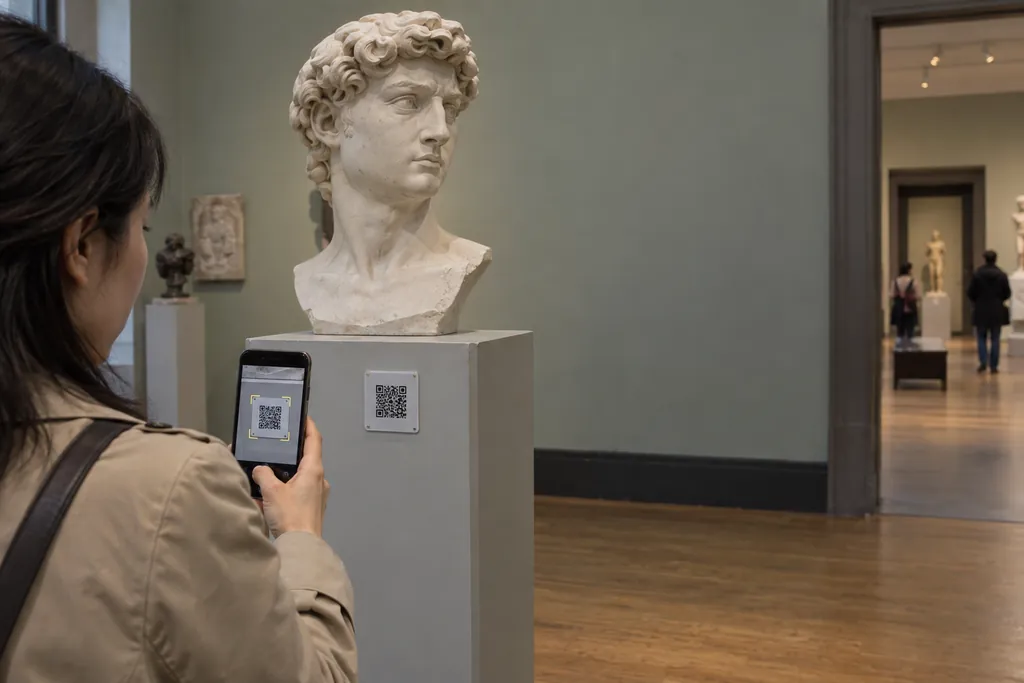
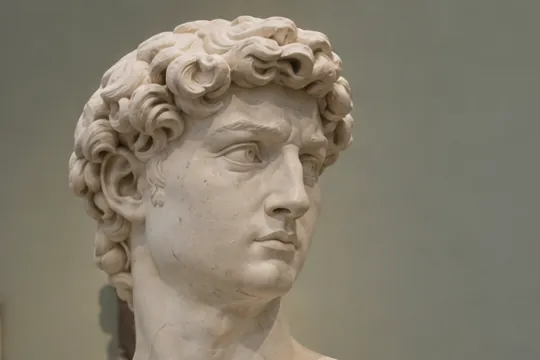
Renaissance Sculpture Room · 2 / 6
미켈란젤로, 다비드상
Follow along
 Next guideMother-of-Pearl Lacquer: Hands that Carve Light
See the exhibition catalog
Next guideMother-of-Pearl Lacquer: Hands that Carve Light
See the exhibition catalog
- 1
Generate Voice
Create guide scripts in the language and voice you want and save them to your library.
- 2
Automatic QR Code Generation
A QR code is generated automatically for the audio you saved.
- 3
Use instantly
Download the QR code and provide audio guidance anywhere.
- Art museums & galleries
- Museums & memorials
- Heritage & tourist sites
- Workshops & studios
- Showrooms & car dealerships
- Pop-up stores & brand exhibitions
From the STARTER plan · 3 fixed QR codes you never need to reprint
Learn about the QR audio guideLeading businesses and institutions
use this voice platform every day.
The biggest advantage I felt after using it is how natural it sounds. Even as an AI voice, it's incredibly natural — a different level of quality from the choppy machine voices of the past. Natural, and then some. You can just think of it as a human voice.
It was so convenient to enter text easily and get the voice file I wanted. It's simple and friendly to use, so anyone could pick it up. The voice file quality is excellent, and I was really satisfied with the natural pronunciation and voice. When issues came up, the support team helped quickly and kindly, so I could use it with even more confidence. A service I highly recommend!
For me it was quite a game-changer. Using it eliminated my YouTube recording time and cut about an hour from production. If I used to make one video a day, this is the tool that made two a day possible. It's useful for anyone who needs foreign-language voices too — in a way, I'd call it essential.
Using Kim Min-kyung–Amelia, I recorded about 30,000 characters of mixed English and Korean sentences. I was amazed when the English parts automatically switched to Amelia and the Korean parts to Kim Min-kyung, and amazed again at how natural the intonation and pronunciation were.
I made safety training materials with WeMakeVoice!! So simple and great! Thank you, WeMakeVoice, for letting us give workers consistent training with no variation!!
Because I can fine-tune the speed, tone, and volume in detail right away, I can set and customize the mood of the audio I want in detail — it's really convenient.
I saw that leading domestic companies already use it, and when I heard the actual sample audio, I was amazed by pronunciation and delivery so natural you'd believe it was human. I paid right away and rolled it out at the company, and people's response has been tremendous. I expect the company will keep subscribing regularly. Very satisfied.
The cost is reasonable, it's convenient to use, you can download and use the files, and the conversational feature I needed was added — I'm satisfied.
Some tools only let you get the audio as one whole file, but WeMakeVoice lets you download by paragraph. It downloads as individual files based on line breaks. The feature that organizes what you typed and auto-downloads when you create audio was really convenient too.
Since I use it for small things, I've subscribed a month at a time and repurchased only when needed — this is already my third time. The character allowance is generous, so there's always plenty left, and even if you cancel right after paying you can still use it for the month — so there's no unwanted auto-billing. That's a plus.
At first I avoided AI voices out of a dislike for machine sound, but after using it a few times I found it has many conveniences. I no longer spend time recording my voice over and over, or money on gear to cover for a weak voice.
I use it every day lately, and there seem to be many smooth, easy-to-listen voices. It's worry-free for commercial use and great for simply making personal videos.
Pay only for what you need.
2 months free with annual billing. From Free to Enterprise, choose to match your workload.
- Just by signing up
- Try every voice (1,000 characters)
- File downloads on paid plans
- 25,000 chars/month
- Mixer: 3 projects
- Commercial license included
- 70,000 chars/month
- 3 voice clones
- Full mixer (WAV · normalization · ducking)
Before you sign up — frequently asked questions.
How much can I try for free?
Just sign up to create and listen to audio in every voice, up to 1,000 characters. Downloading files and commercial use are available on paid memberships (from Starter up).
Can I use it commercially, e.g., for ads?
Yes. Voices created on any paid membership (from Starter up) can be used anywhere — ads, broadcasts, education, content. Membership is only needed while creating, and files you've made remain free for permanent commercial use even after you cancel.
How many characters can I enter at once?
You can create up to 5,000 characters in a single file at once. With sentence- and paragraph-level download, you can turn 100+ sentences into audio in one go.
Can it pause between sentences?
Yes. The sentence-spacing feature adds 0.1 to 5 seconds between sentences. If you need longer gaps — like for listening tests — you can extend the spacing further from your library.
Can I make phone greetings or ringback tones?
Yes. Enter your content, create the voice file, and provide it to your carrier to complete a phone greeting. You can also add background music to create a ringback tone unique to your company.
Are English, Japanese, and Chinese natural too?
Yes. We support 80 languages, and for major languages we curate voices aiming for native-speaker naturalness. Even when Korean and English are mixed in one sentence, the speaker switches naturally.
How do I find a voice I like?
You can preview and compare all 984 voices using the same sentence. Narrow down by use and mood, pick the best fit, and export — that's the flow we designed.
Is voice cloning safe?
Training audio and trained models are used only within your account. They are never used for external training and are immediately discarded when your account is deleted. For cloning executives or voice actors, we recommend obtaining their consent.
Can I pay for just one month?
Yes. After paying for a membership, cancel recurring billing under [My info] → [Billing], and you'll use it for just the month you paid — with no automatic renewal.
Can I pay as a company (tax invoice / corporate card)?
Yes. We support both card and tax-invoice payments. When paying with a corporate card, enter your business registration number in the date-of-birth field.
Can I get a refund?
Within 7 days of signup and below a certain usage threshold, you get a full refund. Otherwise, we refund the remaining period on a pro-rated basis.
I didn't get the verification email. What do I do?
Some corporate email systems may not receive the verification email. Click the chat icon at the bottom-right of the screen to ask an agent, and we'll help you verify.
The voice you make today,
you use in tomorrow's ad.
Every feature available the moment you sign up. Credit card only at payment.